
Fine-tuning large language models.
We show how to adapt large language models to the desired requirements.
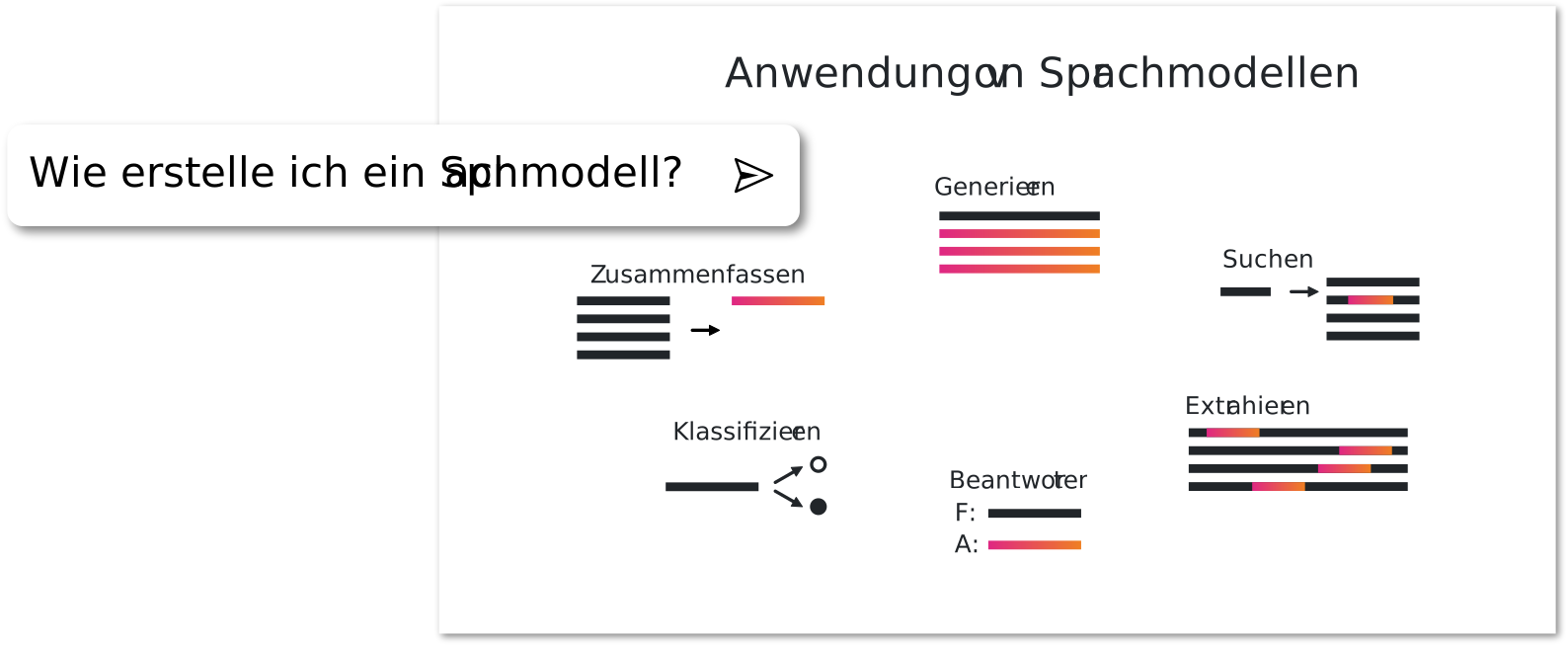
Fine-tuning
So far, pretrained language models are merely text completers. That means: to interact with them, you have to phrase the question in a specific format..
Question: Who is the Federal Chancellor of Germany? Answer:
With fine-tuning and a "prompt" template, you can simplify this interaction and tailor it to specific needs. But that is not the only reason to adapt a large language model. Fine-tuning can enable additional tasks:

Classification: categorizing texts into spam, positive/negative reviews, etc.

Summarization of texts

Extracting information

Answering questions

Searching for semantically similar meanings
In the following, we focus on adapting the language model for instructions. For this, we use the dataset translated in our last post.
Both language models that we train in the course of this post are published on Huggingface:
- DElefant
- DElefant-MPT
Full fine-tuning
We can fully train the language model similarly to pretraining with the Faust dataset. This means that all weights can be adjusted. The disadvantage is that all layers, gradients, and the optimizer must be loaded during training as well. The largest model we can train this way with 24 GB VRAM is around 7B parameters. For training, we use an existing repository called Llama-X with an adaptation from WizardLM.More details about the code follow a bit later in the chapter about setting up training with PEFT and QLoRA fine-tuning.
deepspeed Llama-X/src/train_freeform.py \
                --model_name_or_path malteos/bloom-6b4-clp-german \
                --data_path ger_alpaca_evol_instruct_70k_e.json \
                --output_dir ./full_finetune \
                --num_train_epochs 2 \
                --model_max_length 2048 \
                --per_device_train_batch_size 2 \
                --per_device_eval_batch_size 1 \
                --gradient_accumulation_steps 8 \
                --evaluation_strategy "no" \
                --save_strategy "steps" \
                --save_steps 400 \
                --save_total_limit 3 \
                --learning_rate 2e-5 \
                --warmup_steps 2 \
                --logging_steps 2 \
                --lr_scheduler_type "cosine" \
                --report_to "tensorboard" \
                --gradient_checkpointing True \
                --deepspeed deepspeed.json \
                --bf16 True
The hyperparameters were chosen similarly to those in the WizardLM release. Training is relatively demanding here and we need the DeepSpeed library in order to train the model at all. With DeepSpeed, we can offload parts of the training from the GPU, for example to the CPU, such as optimizer computations. Below is an excerpt from the training, which took a total of 50 hours on an RTX 3090.
{'loss': 0.6569, 'learning_rate': 1.2166081717612798e-11, 'epoch': 2.0}
{'loss': 0.6017, 'learning_rate': 0.0, 'epoch': 2.0}
{'train_runtime': 180191.995, 'train_samples_per_second': 0.716, 'train_steps_per_second': 0.022, 'train_loss': 0.8655412262190069, 'epoch': 2.0}
100%|█████████████████████████████████████████████████████████████████████████████████████████████████████████████████████████████████████| 4030/4030 [50:03:11<00:00, 44.71s/it]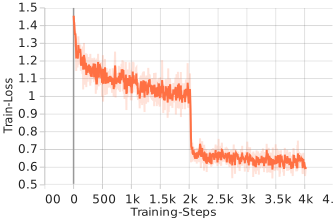
The loss function of the training is shown in the image on the left. You can see that the training runs stably and the loss steadily decreases. The end of the first epoch after around 2k training steps is also clearly visible. The loss of about 0.6 is also relatively low.
QLoRA / PEFT fine-tuning
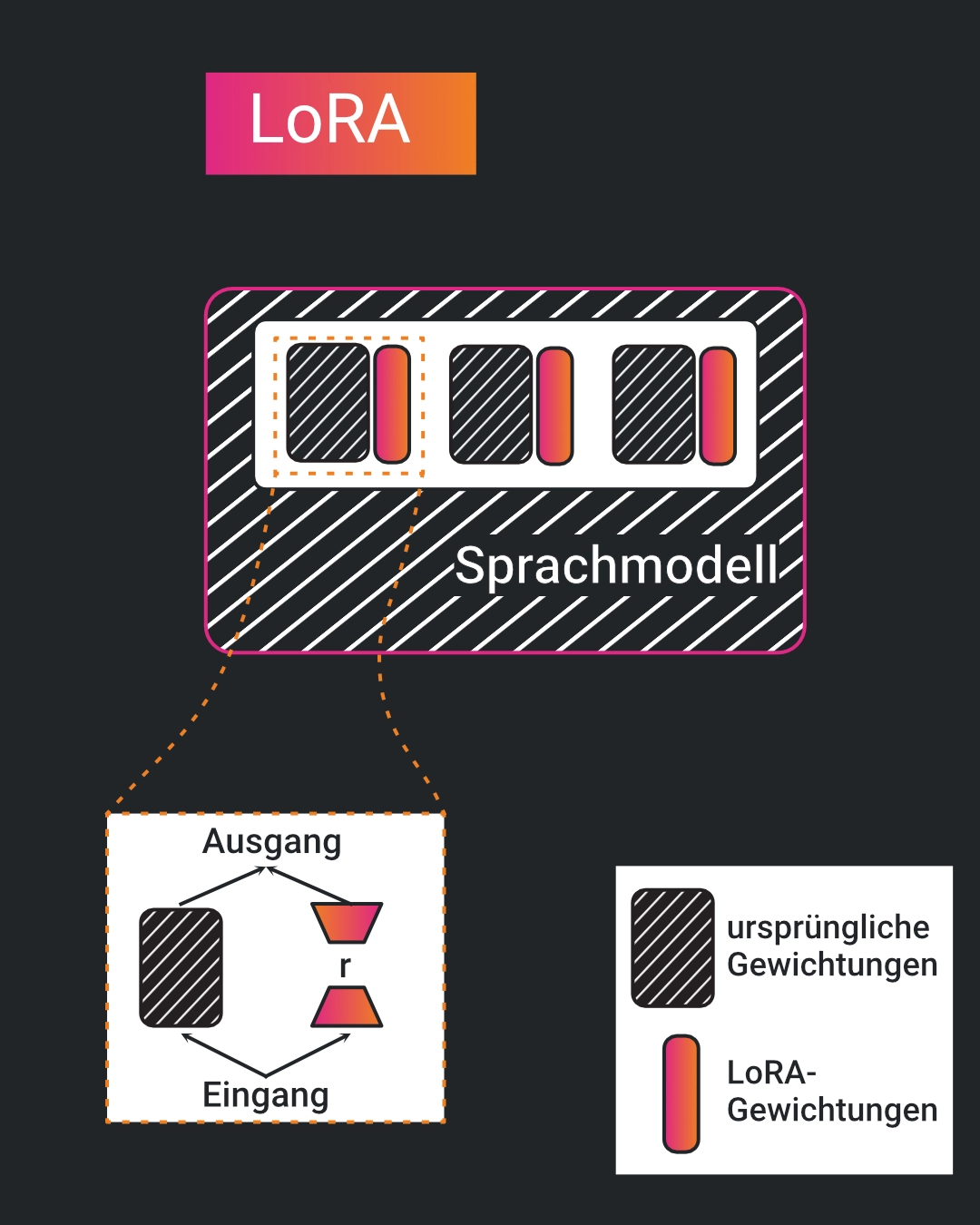
However, we do not have to adapt the entire model to achieve a sufficient result. It is enough to adjust only a certain number of parameters. Here we use a function called Low-Rank Adaptation (LoRA).LoRA paper The way LoRA works can be seen in the image. Later on, we will use the PEFT library to train a (Q)LoRA.
In a further step, LoRA was adapted to also handle quantized models.
Quantization is used to reduce the compute and memory requirements of the model while maintaining a certain accuracy. In this process, the precision of the model parameters and activations is reduced. Instead of storing them as 16-bit or 64-bit floating values in RAM, 4-bit or 8-bit precision is typically used. More details can be found in the paper .
Since QLoRA fine-tuning no longer requires as much GPU memory, we can also use a larger language model. Here we chose MPT-30B because other models such as Falcon-40B would still be too large for GPU memory, and the OpenLLaMA models unfortunately cannot interpret program code correctly, while the translated dataset contains a large amount of code.
Further challenges include, for example, that the LoRA tuning functionality with PEFT is not implemented and that "gradient accumulation" does not work. For the PEFT tuning problem, community code adjustments can be used, but gradient accumulation still does not seem to work. We therefore decided to use two RTX 3090 GPUs with 48 GB VRAM and reduce the block size to 1024 tokens. The model can therefore no longer understand text sequences that are as long. What 1024 tokens correspond to can easily be examined with the interactive tokenizer . However, this only allowed us to reach a batch size of 4, which might be too small for stable training. Nevertheless, we want to investigate whether a model trained mostly on English texts can be adapted to German instructions.
The code is largely based on the previously mentioned training code Llama-X. We first define the desired hyperparameters as well as further variables used later:
"MODEL_NAME = '~/mpt_30B'
TOKENIZER_NAME = MODEL_NAME
DATA_PATH = r'ger_alpaca_evol_instruct_70k_e.json'
# Max. Modelllänge:
BLOCK_SIZE = 1024
BATCH_SIZE = 4
LR_SCHEDULER = 'linear'
GR_ACCUMULATION_STEPS = 4
EPOCHS = 3
WARMUP_RATIO = 0.04
LEARNING_RATE = 2e-5
IGNORE_INDEX = -100
DEFAULT_PAD_TOKEN = '[PAD]'
DEFAULT_EOS_TOKEN = '</s>'
DEFAULT_BOS_TOKEN = '</s>'
DEFAULT_UNK_TOKEN = '</s>'
PROMPT_DICT = {
'prompt_input': (
' {instruction} '\n\n### Response:'
),
'prompt_no_input': (
' {instruction} '\n\n### Response:'
)
}"
Here, for example, we could also change the template that determines how the instructions are fed to the language model. In the first step, we still kept the actual instructions in English.
Next, we use the BitsAndBytes library to load the model with quantization. Then the tokenizer is loaded and special tokens for padding and similar are added. Here we also define the maximum length the language model can handle. The larger this value is chosen, the longer the relationships that can be captured. However, more GPU memory is required.
# Laden der notwendigen Biblotheken
import transformers
from transformers import AutoTokenizer, AutoModelForCausalLM
from typing import Optional, Dict, Sequence
from transformers import BitsAndBytesConfig

# Laden der Quantisierung
nf4config = BitsAndBytesConfig(
    load_in_4bit=True,
    bnb_4bit_quant_type="nf4", # Performance von NF4 besser als FP4#
    bnb_4bit_use_double_quant=True,
    bnb_4bit_compute_dtype=torch.bfloat16
)
# Laden des Tokenizers & Modells:
model = AutoModelForCausalLM.from_pretrained(MODEL_NAME, quantization_config=nf4config, device_map="auto")
tokenizer = AutoTokenizer.from_pretrained(TOKENIZER_NAME,
                                        model_max_length=BLOCK_SIZE,
                                        padding_side="right",
                                        use_fast=False)

# Definieren eines Padding-Tokens:
if tokenizer.pad_token is None:
    num_new_tokens = tokenizer.add_special_tokens({"pad_token": DEFAULT_PAD_TOKEN})
    model.resize_token_embeddings(len(tokenizer))

    input_embeddings = model.get_input_embeddings().weight.data
    output_embeddings = model.get_output_embeddings().weight.data

    input_embeddings_avg = input_embeddings[:-num_new_tokens].mean(dim=0, keepdim=True)
    output_embeddings_avg = output_embeddings[:-num_new_tokens].mean(dim=0, keepdim=True)

    input_embeddings[-num_new_tokens:] = input_embeddings_avg
    output_embeddings[-num_new_tokens:] = output_embeddings_avg

if "llama" in MODEL_NAME:
    tokenizer.add_special_tokens(
        {
            "eos_token": DEFAULT_EOS_TOKEN,
            "bos_token": DEFAULT_BOS_TOKEN,
            "unk_token": DEFAULT_UNK_TOKEN,
        }
    )
After that, we load the dataset via a torch dataset and prepare our data for training by tokenizing it in advance.
# Definieren der Funktionen zum Erzeugen eines Datensatzes - Entnommen von Llama-X
import json
from torch.utils.data import Dataset
import torch
from dataclasses import dataclass, field

def preprocess(
    sources: Sequence[str],
    targets: Sequence[str],
    tokenizer: transformers.PreTrainedTokenizer,
) -> Dict:
    """Preprocess the data by tokenizing."""
    examples = [s + t for s, t in zip(sources, targets)]
    examples_tokenized, sources_tokenized = [_tokenize_fn(strings, tokenizer) for strings in (examples, sources)]
    input_ids = examples_tokenized["input_ids"]
    labels = copy.deepcopy(input_ids)
    for label, source_len in zip(labels, sources_tokenized["input_ids_lens"]):
        label[:source_len] = IGNORE_INDEX
    return dict(input_ids=input_ids, labels=labels)

class SupervisedDataset(Dataset):
    """Dataset for supervised fine-tuning."""

    def __init__(self, data_path: str, tokenizer: transformers.PreTrainedTokenizer):
        super(SupervisedDataset, self).__init__()
        print("Loading data...")
        with open(data_path, "r") as f:
            list_data_dict = json.load(f)

        print("Formatting inputs...")
        prompt_input, prompt_no_input = PROMPT_DICT["prompt_input"], PROMPT_DICT["prompt_no_input"]
        sources = [
            prompt_input.format_map(example) if example.get("input", "") != "" else prompt_no_input.format_map(example)
            for example in list_data_dict
        ]
        targets = [f"{example['output']}{tokenizer.eos_token}" for example in list_data_dict]

        print("Tokenizing inputs... This may take some time...")
        data_dict = preprocess(sources, targets, tokenizer)

        self.input_ids = data_dict["input_ids"]
        self.labels = data_dict["labels"]

    def __len__(self):
        return len(self.input_ids)

    def __getitem__(self, i) -> Dict[str, torch.Tensor]:
        return dict(input_ids=self.input_ids[i], labels=self.labels[i])

@dataclass
class DataCollatorForSupervisedDataset(object):
    """Collate examples for supervised fine-tuning."""

    tokenizer: transformers.PreTrainedTokenizer

    def __call__(self, instances: Sequence[Dict]) -> Dict[str, torch.Tensor]:
        input_ids, labels = tuple([instance[key] for instance in instances] for key in ("input_ids", "labels"))
        input_ids = torch.nn.utils.rnn.pad_sequence(
            input_ids, batch_first=True, padding_value=self.tokenizer.pad_token_id
        )
        labels = torch.nn.utils.rnn.pad_sequence(labels, batch_first=True, padding_value=IGNORE_INDEX)
        return dict(
            input_ids=input_ids,
            labels=labels,
            attention_mask=input_ids.ne(self.tokenizer.pad_token_id),
        )

# Erzeugen des eigentlichen Datensatzes:
data_module = {
    "train_dataset": SupervisedDataset(tokenizer=tokenizer, data_path=DATA_PATH),
    "eval_dataset": None, # Hier könnte noch ein evaluations-Datensatz verwendet werden
    "data_collator": DataCollatorForSupervisedDataset(tokenizer=tokenizer),
}
Now we can configure the actual training. The most important parameters and their impact on training:
- per_device_train_batch_size: Number of samples processed simultaneously per GPU. Limited by GPU memory.
- learning_rate: Factor that controls how strongly the weights are updated.
- lr_scheduler_type: How the learning rate is adjusted over time.
- num_train_epochs: Number of training epochs. Example: 2 epochs means the model has seen the training data twice during training.
- gradient_accumulation_steps: Number of gradient accumulation steps; this can artificially increase the effective batch size.
# Konfigurieren der Einstellungen:
from transformers import TrainingArguments
training_args = TrainingArguments(
        "./Qlora/Gerlefant",
        per_device_train_batch_size=BATCH_SIZE,
        lr_scheduler_type=LR_SCHEDULER,
        save_strategy="no",
        evaluation_strategy="steps",
        logging_strategy="steps",
        logging_steps=1,
        save_total_limit=4,
        eval_steps=None,
        per_device_eval_batch_size=BATCH_SIZE,
        learning_rate=LEARNING_RATE,
        warmup_ratio=WARMUP_RATIO,
        optim="paged_adamw_8bit", # adamw_torch
        num_train_epochs=EPOCHS,
        bf16=True,
        max_grad_norm=0.3,
        adam_beta2=0.999,
        gradient_accumulation_steps=GR_ACCUMULATION_STEPS)
Afterwards, we have to prepare the model for LoRA training. Here we can define the size of the adaptations. The most important parameters are:
- r: "Rank" of the adaptations. Roughly speaking, it determines the size of the matrices used for adaptation: small r leads to simpler low-rank matrices, and thus fewer trainable parameters. Trade-off between compute effort and possible overfitting with large r versus underfitting, weaker adaptation, and lower compute effort with small r.
- alpha:Scaling factor that specifies the magnitude of the LoRA adaptations. → a higher alpha value increases the influence; a lower value gives more weight to the original connections.
- target_modules:Model modules that should be adapted.
- lora_dropout: Dropout probability for the LoRA modules. Dropout is used for regularization to prevent overfitting.
A good explanation of the LoRA adaptation can be found on lightning.ai .
In the following, we apply the LoRA adaptation to all linear layers of the model.
model.is_parallelizable = True
model.model_parallel = True

# Prepare kbit Training:
from peft import prepare_model_for_kbit_training
model.gradient_checkpointing_enable()
model = prepare_model_for_kbit_training(model)

# Anzeigen der Parameter die Trainiert werden:
def print_trainable_params(model):
    t_params = 0
    all_params = 0
    for _,param in model.named_parameters():
        all_params += param.numel()
        if param.requires_grad:
            t_params += param.numel()
    print(f"Trainable params: {t_params} || all_params: {all_params} || trainable%: {100*t_params/all_params}")

from peft import LoraConfig, TaskType, get_peft_model

lora_config = LoraConfig(
    r=64,
    lora_alpha=16,
    target_modules=["up_proj", "down_proj"],
    lora_dropout=0.05,
    inference_mode=False,
    bias="none",
    task_type=TaskType.CAUSAL_LM
)

model = get_peft_model(model, lora_config)

print_trainable_params(model)
Finally, we define our Huggingface trainer and start the actual training.
trainer = Trainer(
    model=model,
    args=training_args,
    tokenizer=tokenizer,
    **data_module
)

# Fine-tune the model
trainer.train()

peft_model_id="./PEFT_MODEL"
trainer.model.save_pretrained(peft_model_id)
tokenizer.save_pretrained(peft_model_id)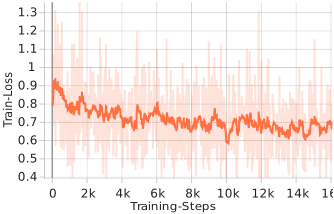
The loss function of the QLoRA training is shown in the image on the left. In contrast to the previous full fine-tuning, you can clearly see much stronger oscillations. This is mainly due to the significantly smaller effective batch size of only 4. As a result, the language model may not learn generalization, but instead only adapts to these few data points. In addition, the difference between batches can be much larger. A larger batch size would therefore be helpful. Nevertheless, on average we reach a training loss of about 0.65, i.e., in a comparable range to the previous full training.
Summary
- Pretrained language models are currently only text completers - Fine-tuning enables adaptation to different tasks and simplifies interaction with the model - Full fine-tuning allows adapting all weights, but also requires loading all layers, gradients, and the optimizer - The maximum model size is therefore ~7B parameters with 24 GB VRAM - Efficient model adaptation with Low-Rank Adaptation (LoRA) is possible by adapting only a certain number of parameters - QLoRA fine-tuning allows using a larger language model through quantization (MPT-30B) and requires less GPU memory - Full fine-tuning took about 50 hours and QLoRA fine-tuning about 60 hours
In our last post we compare the two trained models using example questions with commercially available language models from AlephAlpha.