
Pretraining of large language models.
We show how you can train your own data into a language model.
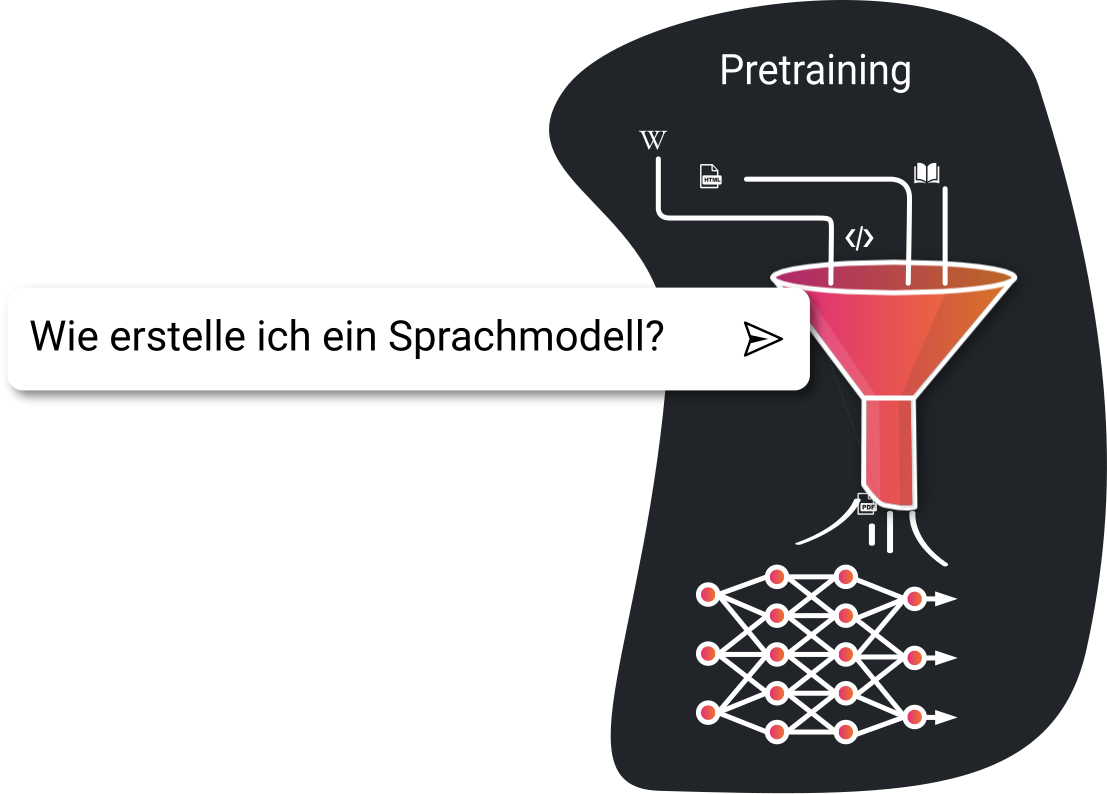
LLM dataset
When considering model sizes and token counts, the English numbering system must be taken into account. 1T corresponds to an English trillion, i.e. a German Billion. The same applies to the English billion (B), which corresponds to a German Milliarde.
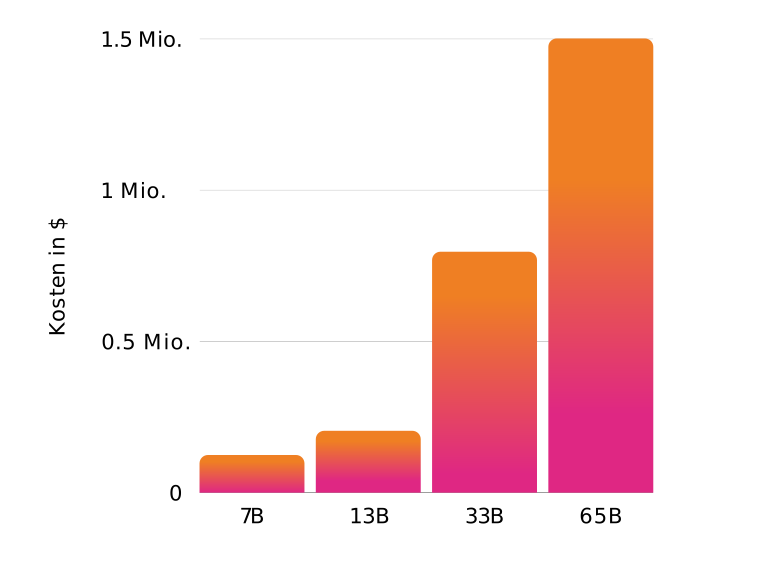
Training costs
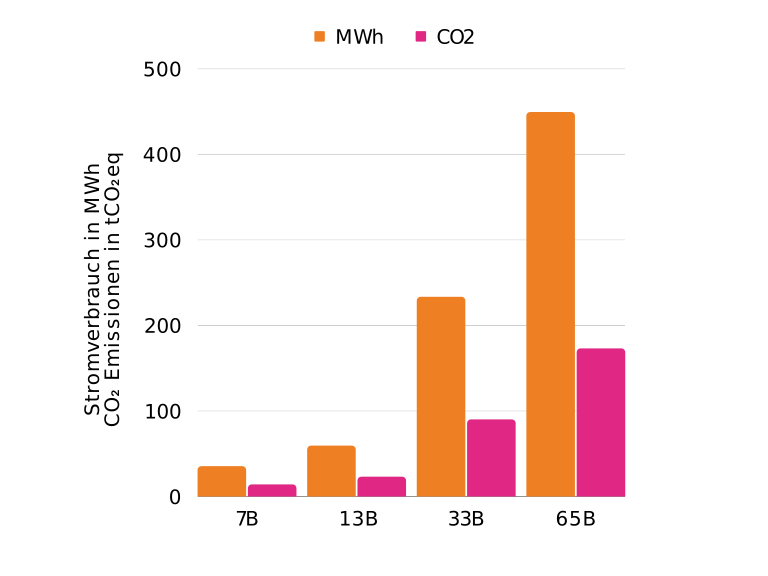
Power consumption and CO2 emissions
In the previous post we showed how to preprocess different text formats and which data was used for LLaMA training. But how was the LLaMA model trained by Meta? In general, there is not just one LLaMA model by Meta. In total, 4 different model sizes were trained. These vary in size between 7B and 65B parameters.
What are parameters?
Parameters for LLMs are the values of a language model that can be adjusted during the learning process. You can think of them like neurons in the brain. The more parameters there are, the deeper the understanding and the more information the model can generally learn. However, the data also plays an important role.The two smaller models were trained with 1T tokens and the two larger models with 1.4T tokens. For the 65B LLaMA model, training on 2048 A100 GPUs took roughly 21 days. So how much would training the largest model cost? If we assume 1 million GPU compute hours, then for a cluster with 8 GPUs (A100) at a price of $12 per hour, the total cost would be $1.5 million.A100 costs However, this is not feasible because training on 8 GPUs would take over 14 years. For a shorter training time of about 3 months, you would therefore need a compute cluster with 512 A100 GPUs. The monthly cost for 16 A100 on Google Cloud, for example, would be over $1 million USD, resulting in total costs of about $2.6 million.A100 costs (Google Cloud) If we ignore hardware costs and look only at the electricity costs incurred, total costs of €135k result, assuming electricity costs of 30 ct/kWh. With a smaller model, compute time and costs are reduced accordingly. By adapting several smaller models, both costs and CO2 emissions can be reduced.
Training a custom dataset
We have seen that the initial training of the models requires enormous resources. The LLaMA models make it possible to create customized language models with significantly less effort because they have already learned the basic knowledge. However, so far they are "only" completion models. Accordingly, you also have to interact with them in that way. In a later step, we show how to convert language models into so-called chat- or instruction-based language models. First, we show how to train the writing style from Johann Wolfgang von Goethe's Faust into a large language model in order to obtain a completion of user-provided text in the style of Faust. We have already seen that the LLaMA and Falcon models have only limited knowledge of German. As a first step, we will therefore use a specialized model that was adapted with a large amount of German data: BLOOM-CLP German 6.4B.Link to the model on Huggingface The German language skills are greater here and the tokenizer is optimized for German. The raw dataset used by DFKILink to the German raw dataset partly contains nonsensical (e.g. sequences of numbers) and also non-youth-friendly content. Allegedly, the dataset was post-processed by DFKI to remove such content. However, the fully trained modelLink to the German language model still outputs it. Examples include the number sequence 12286;12294 or the sentence start "Die junge Oma" when entered in greedy modeIn greedy mode, the language model uses only the most probable tokens, i.e. the content was still present in the training dataset. In a commercial application, unwanted content should ideally be removed already during data collection (scraping) via an exclusion list, or during data preprocessing. If you want to build your own model on top of an already trained model, the output must therefore be checked for such content. For training, we use the Transformers library, which uses PyTorch for the actual training. Since we use an RTX 3090 as hardware, some additional adjustments are necessary, including integrating the Deepspeed library, because otherwise 24 GB of GPU memory would not be sufficient.
Tokenizer
First, we need to load a tokenizer. For this, we again use the Transformers library:
from transformers import AutoTokenizer, AutoModelForCausalLM

MODEL_NAME = "malteos/bloom-6b4-clp-german"

tokenizer = AutoTokenizer.from_pretrained(MODEL_NAME, use_fast=False)
tokenizer.pad_token = tokenizer.eos_token
Output
Downloading (…)okenizer_config.json:   0%|          | 0.00/700 [00:00<?, ?B/s]
Downloading tokenizer.model:   0%|          | 0.00/500k [00:00<?, ?B/s]
Downloading (…)cial_tokens_map.json:   0%|          | 0.00/411 [00:00<?, ?B/s]
Tokenizing is used to preprocess text data so that it is understandable for the language model. You can think of it like a kind of translation.
The individual text segments are converted into individual tokens or numbers. Here is an example:
from termcolor import colored
from pprint import pprint

def visualize_tokenizer(tokenizer, example_text):
    print("Tokenized Text:")
    tokens = tokenizer.encode(example_text)
    token_colors = {}
    colored_tokens = []
    str_tokens = []
    for i, token in enumerate(tokens):
        token_colors[token] = 'on_blue' if i % 2 == 0 else 'on_dark_grey'
        colored_token = colored(tokenizer.decode(token), on_color=token_colors[token])
        str_tokens.append(colored(token, on_color=token_colors[token]))
        colored_tokens.append(colored_token)

    print(' '.join(str_tokens))
    print(''.join(colored_tokens))
    print(len(tokens))

visualize_tokenizer(tokenizer, dataset[0]["text"])
Output
So we can see that not every word automatically corresponds to one token. In addition, each tokenizer is adapted to a language or a dataset. Therefore, an English tokenizer needs more tokens for the same text. Or vice versa: If we translate the same text into English and then tokenize it, a total of 355 tokens are required instead of 280. In comparison, the German text has 179 words and 1056 characters, while the English text has 194 words and 1011 characters. Why does that matter for us? The language model can only output a certain number of tokens per second. If more tokens are needed for the same length of text, the model output is slower. Commercial API billing is also usually based on token count. For the same text length, you pay more at OpenAI for German than for English.
Interactive LLaMA tokenizer
English LLaMA tokenizer
Characters
Tokens
German BLOOM tokenizer
Characters
Tokens
Tokenizing the dataset
from datasets import Dataset, Features, Value
    dataset = Dataset.from_dict({"text": final_text}, features=Features({"text": Value("string")}))

    # Aufsplitten in einen Trainings- und Validierungsdatensatz:
    # dataset = dataset.train_test_split(test_size=TRAIN_TEST_SPLIT)

    # Tokenizen des gesamten Datensatzes:
    def tokenize(batch):
        return tokenizer(list(batch["text"]))

    dataset = dataset.map(tokenize, batched=True, remove_columns=["text"])

    # Aneinanderreihen der Texte:
    def group_texts(examples):
        concatenated_examples = {k: sum(examples[k], []) for k in examples.keys()}
        total_length = len(concatenated_examples[list(examples.keys())[0]])

        if total_length % BLOCK_SIZE != 0:
            padding_length = BLOCK_SIZE - (total_length % BLOCK_SIZE)
            for k in concatenated_examples.keys():
                concatenated_examples[k] += [tokenizer.pad_token_id] * padding_length
            total_length += padding_length

        result = {
            k: [t[i : i + BLOCK_SIZE] for i in range(0, total_length, BLOCK_SIZE)]
            for k, t in concatenated_examples.items()
        }
        result["labels"] = result["input_ids"].copy()
        return result

    dataset = dataset.map(group_texts, batched=True)

    flat_list = [item for sublist in dataset['input_ids'] for item in sublist]
    print("Anzahl der gesamten Token im Datensatz:", len(flat_list))
Output
Map: 0%| | 0/799 [00:00<?, ? examples/s]
Anzahl der gesamten Token im Datensatz: 45056
Preparing the training
As already mentioned, some settings have to be configured for training because an RTX 3090 is used and memory is therefore limited to 24 GB. First, we create a DeepSpeed configuration so that the whole setup can run on the GPU. Then we create our training configuration, the corresponding trainer, and load the language model.
from transformers import TrainingArguments, Trainer, default_data_collator

    print("Vorbereiten der Trainingseinstellungen")
    training_args = TrainingArguments(
        "./output",
        per_device_train_batch_size=BATCH_SIZE,
        logging_steps=1,
        save_total_limit=2,
        save_strategy="epoch",
        evaluation_strategy="no",
        per_device_eval_batch_size=BATCH_SIZE,
        learning_rate=LR,
        weight_decay=WEIGHT_DECAY,
        warmup_steps=WARMUP_STEPS,
        optim="adam",
        num_train_epochs=EPOCHS,
        push_to_hub=False,
        bf16=True,
        gradient_checkpointing=True,
        deepspeed=deepspeed, # Hier json Konfiguration verlinken oder in Python die Konfiguration definieren
        gradient_accumulation_steps=GRADIENT_ACCUMULATION_STEPS
    )

    print("Laden des Modells")
    model = AutoModelForCausalLM.from_pretrained(MODEL_NAME, use_cache=False)
    model.resize_token_embeddings(len(tokenizer))

    trainer = Trainer(
        model=model,
        args=training_args,
        train_dataset=dataset['train'],
        eval_dataset=dataset['test'],
        tokenizer=tokenizer,
        data_collator=default_data_collator,
    )

    # Modell trainieren
    trainer.train()
Output
Vorbereiten der Trainingseinstellungen
3%|▎         | 1/30 [00:36<17:23, 35.97s/it]
{'loss': 3.6562, 'learning_rate': 2e-05, 'epoch': 0.1}
    33%|███▎      | 10/30 [06:49<12:00, 36.00s/it]
{'loss': 2.9609, 'learning_rate': 2e-05, 'epoch': 0.95}
    67%|██████▋   | 20/30 [17:13<06:44, 40.40s/it]
{'loss': 1.9102, 'learning_rate': 2e-05, 'epoch': 1.9}
    97%|█████████▋| 29/30 [31:31<00:56, 56.02s/it]
{'loss': 1.1523, 'learning_rate': 2e-05, 'epoch': 2.76}
100%|██████████| 30/30 [32:14<00:00, 52.11s/it]
{'loss': 1.0098, 'learning_rate': 2e-05, 'epoch': 2.86}
100%|██████████| 30/30 [37:10<00:00, 74.33s/it]
{'train_runtime': 2230.0221, 'train_samples_per_second': 0.112, 'train_steps_per_second': 0.013, 'train_loss': 2.187890625, 'epoch': 2.86}
TrainOutput(global_step=30, training_loss=2.187890625, metrics={'train_runtime': 2230.0221, 'train_samples_per_second': 0.112, 'train_steps_per_second': 0.013, 'train_loss': 2.187890625, 'epoch': 2.86})
Applying the language model
Since the model was trained as a text completer, an initial sequence must be provided to the language model. For this purpose, we use a portion of the original text:
MARGARETE.
Müßte vor dem Herren schamrot werden.
MEPHISTOPHELES.

Der Text geht folgend noch weiter:
Vor keinem Könige der Erden.
Marthe:
Da hinterm Haus in meinem Garten
Wollen wir der Herren heut abend warten.
Now we apply the model. To do this, we tokenize the provided text and pass it to the language model. Afterwards, we need to decode the returned text again to make it readable.
enc_txt = tokenizer.encode("MARGARETE.\nMüßte vor dem Herren schamrot werden.\nMEPHISTOPHELES.", return_tensors="pt").to("cuda")
    ret_txt = model.generate(enc_txt, max_length=512, repetition_penalty=1.05)
    print(tokenizer.decode(ret_txt[0]))
Output
MARGARETE.
    Müßte vor dem Herren schamrot werden.
    MEPHISTOPHELES.
    Das kommt nur auf die Weise an,
    Wie man sich in Gegenwart des Herrn verhält;
    Ich weiß mich sehr wohl zu betragen—
    Nur muß ich gleich wieder fort!
    <|endoftext|>FAUST.
    Du darfst nicht so von dir gehen!
    Was fragst du nach deiner Nachbarin?
    Sie ist doch eine Fremde hier.
    (Er geht weiter.)
    CHOR DER ENGEL.
    Christ ist erstanden! Freudig sei der Welt!
    Die Sonne steige nun höher denn je und scheine heller als sonst über den Auen, bis sie im Meer versinke.
    [...]
Summary
- The cost of training the LLaMA model varies depending on model size and is about $1.5 million for the largest model.
- With electricity costs of 30 ct/kWh, the electricity cost for training would be €135k.
- By using smaller, specifically adapted models, compute time, costs, and CO₂ emissions can be reduced.
- It was shown how a tokenizer makes text understandable for a language model and the disadvantages of a multilingual tokenizer were highlighted.
- It is shown how to train a specific German language model (BLOOM-CLP German 6.4B) for completing texts in the style of Johann Wolfgang von Goethe's Faust.
- Different documents can be used, such as internal business processes, documentation, and similar materials.
In our next blog post we show how to use a language model for translating large datasets.