
Translation with local language models.
Your own free translator for large volumes of text.
Translation of an English dataset
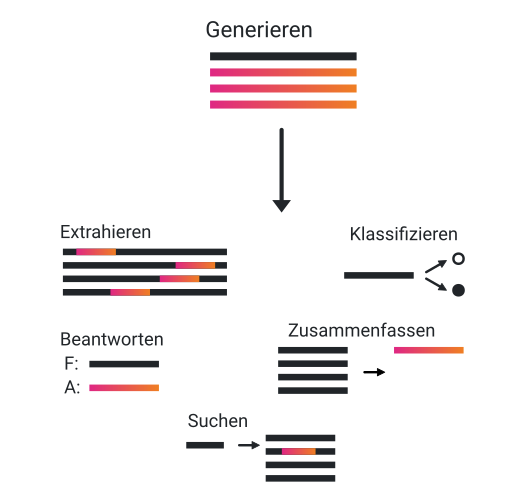
So far, we have only trained the language models with a large amount of data. As a result, the language model merely continues the input and you have to interact with it in a specific way.
So we cannot simply ask questions and the language model responds to them. For that, we still need to perform finetuning. In general, many different tasks can be trained. These include:
- Classification: categorizing into good/bad reviews, questions with predefined answers, ... - Extraction: customer data, data - Summarization: summarizing long texts, generating abstracts - Answering: answering questions with or without provided information - Search: finding information based on linguistic similarities
To finetune a German model, a corresponding dataset is required. On the one hand, such datasets can be created manually. One example is the Databricks dataset, which was created by more than 5,000 employees through an internal competition.Dolly Datensatz On the other hand, the dataset can also be generated through interaction with other LLMs from Anthropic or OpenAI. There are also many different approaches here, such as collecting interactions with ChatGPT via ShareGPTShareGPT or using the Evol dataset from WizardLM.WizardLM
However, no new dataset is to be created below, because manual creation can be very time-consuming and automated creation requires API access including payment. An alternative is to translate an existing dataset. Some datasets are suitable for this, which are used for finetuning English language models. These can usually be downloaded via the corresponding GitHub repositories or via Huggingface.
An overview can be obtained, for example, by looking at benchmarks of different models and then using the datasets used to train them for your own training as well.Leaderboard In general, you also have to distinguish between different model sizes. On consumer GPUs with 24 GB VRAM, models up to 33B can be trained with a few tricks.QLoRA-Paper
In addition, many of these datasets also have "unfiltered" variants in which limitations in LLM outputs are filtered out. This has the advantage that the model trained later sometimes delivers better responses and answers less often in the context of "I am an AI model and have no opinion on this". However, it also means that no safety mechanisms are present anymore. There are also different ways to perform the translation:
Translation with DeepL or Google Translate
The prices for translation are about €20 per 1 million characters. The Alpaca evol Instruct dataset, for example, contains over 130 million characters, which would correspond to a price of €2,605.
import pandas as pd
print("Preisberechnung für Deepl")
dataset = pd.read_json("evol_instruct_70k/alpaca_evol_instruct_70k.json")
total = dataset["instruction"].str.len().sum()+dataset["output"].str.len().sum()
print(f"Total characters: {total}, Total price: {total/1000000*20}")
Output
Preisberechnung für DeepL
Total characters: 130296989, Total price: 2605.9397799999997
Translation with a language model / GPT-4
Let us assume that in English about 4 characters correspond to one tokenCharacters per token this results in 977 dollars at 0.03 dollars per 1K tokens with the GPT-4 model and an 8K context. Since fewer characters per token are used in other languages, the price is probably even higher than the calculated price. Only the ChatGPT model with 0.002 dollars per 1K tokens still seems reasonable. This would result in costs of about €100.
import pandas as pd
print("Preisberechnung für GPT4")

dataset = pd.read_json("alpaca_evol_instruct_70k.json")
total = dataset["instruction"].str.len().sum()+dataset["output"].str.len().sum()
print(f"Total characters: {total}, Total price: {total/4/1000*0.03}")
print("Preisberechnung für Chat-GPT")
print(f"Total characters: {total}, Total price: {total/4/1000*0.002}")
Output
Preisberechnung für GPT4
Total characters: 130296989, Total price: 977.2274175
Preisberechnung für Chat-GPT
Total characters: 130296989, Total price: 65.1484945
Translation with open-source language models
Since the two alternatives via API calls can be relatively expensive, it makes sense to use specialized translation models. An overview is provided by the OPUS-MT dashboardOPUS-MT Dashboard, which compares different translation models. Two models stand out here: facebook/wmt19-en-de and opus-mt-align-en-de.
For the translation, we use the Python library Transformers, which runs both the language model and the tokenizer. How the tokenizer works was already described in the previous post.Tokenizer As a dataset, we use the Alpaca Evol Instruct dataset from WizardLM. WizardLM.
First, we load the translation model and the tokenizer with the Transformers library. We chose the opus-mt-en-de model because the Facebook model uses a combination of 4 different models that jointly produce a prediction. However, this integration of multiple models as an ensemble is not yet implemented in the Transformers library.
# Laden des Sprachmodells
from transformers import AutoTokenizer, AutoModelForSeq2SeqLM

model_name = "Helsinki-NLP/opus-mt-en-de"
tokenizer = AutoTokenizer.from_pretrained(model_name)
model = AutoModelForSeq2SeqLM.from_pretrained(model_name).to(device="cuda")
Next, we load the dataset from Huggingface:
# Downloaden des Datensatzes:
!git clone https://huggingface.co/datasets/WizardLM/evol_instruct_70k
# Einlesen des Datensatzes
import pandas as pd
dataset = pd.read_json(r"evol_instruct_70k/alpaca_evol_instruct_70k.json")
dataset| instruction | output | |
|---|---|---|
| 0 | Can you provide a list of healthy habits to ma... | Here's an HTML page with bullet points for hea... |
| 1 | How can we use Python to calculate the GCD (gr... | Yes, that's correct! The function you've provi... |
| 2 | Generate a list of ten essential items a perso... | Sure, here's a list of ten essential items a p... |
| 3 | How can we implement a privacy-enhancing techn... | Homomorphic encryption is a powerful technique... |
| 4 | Can you provide a list of the world's most fam... | Here is the JSON format for the world's most f... |
| ... | ... | ... |
| 69995 | How can I use a pencil in unconventional ways ... | Here are 5 specific examples of how you can us... |
| 69996 | Can you solve this space challenge? Your task ... | Yes, I am up for the challenge! Let's get star... |
| 69997 | I have a list of novels and their correspondin... | Yes, I can help you with that. Here's the SQL ... |
| 69998 | Determine the area of a regular pentagon with ... | Using the formula for the area of a regular pe... |
| 69999 | What is the C++ code to calculate the surface ... | Here is the C++ code to calculate the surface ... |
70000 rows × 2 columns
Data preparation
First, we extract the code in the instructions and outputs. The language model would introduce many errors here and would, for example, translate for or if loops. We replace the code only with "<code_snip>".
import re
import numpy as np

dataset["instruction_code"] = np.nan
dataset["instruction_cleaned"] = np.nan

for i, row in dataset.iterrows():
    code = re.findall(r"```([\s\S]*?)```", row["instruction"])
    if code == []:
        code = [np.nan]
    dataset.at[i, "instruction_code"] = str(code)
    dataset.at[i, "instruction_cleaned"] = re.sub(r"```([\s\S]*?)```", '<code_snip>', row["instruction"], flags=re.DOTALL)

    code_out = re.findall(r"```([\s\S]*?)```", row["output"])
    if code_out == []:
        code_out = [np.nan]
    dataset.at[i, "output_code"] = str(code_out)
    dataset.at[i, "output_cleaned"] = re.sub(r"```([\s\S]*?)```", '<code_snip>', row["output"], flags=re.DOTALL)
Since the language model does not translate line breaks as "\n", we either have to split the texts at those positions or replace them with the HTML tag "<br>".
dataset["instruction"] = dataset["instruction"].str.replace("\n", "<br>")
dataset["output"] = dataset["output"].str.replace("\n", "<br>")
Translation models also work with tokens and have a limited token length of about 512 to 1024 tokens. The texts are therefore split to a certain maximum length, preferably at the end of a sentence or section.
def split_long_string(text, max_length):
    result = []
    while len(text) > max_length:
        if r"\n" in text[:max_length]:
            split_index = text[:max_length].rindex(r"\n") + 2
        elif "." in text[:max_length]:
            split_index = text[:max_length].rindex(".") + 1
        else:
            split_index = max_length
        result.append(text[:split_index].strip())
        text = text[split_index:]
    if text:
        result.append(text.strip())
    return result, len(result)

def split_wrapper(long_str_list, max_len=500):
    short_str_list = []
    split_lens = []

    for single_str in long_str_list:
        short_string, split_len = split_long_string(single_str, max_len)
        short_str_list.extend(short_string)
        split_lens.append(split_len)

    return short_str_list, split_lens

source_instructions ,split_len_instructions = split_wrapper(source_instructions)
source_outputs ,split_len_outputs = split_wrapper(source_outputs)
Translation
Now we can translate the actual texts. To do this, we first define a function and iterate over a dataset in batches:
def translate(model, tokenizer, data):
    tokenized_txt = tokenizer(data, return_tensors="pt", padding=True).to("cuda")
    uebersetzt_txt = model.generate(tokenized_txt["input_ids"],
                                attention_mask=tokenized_txt["attention_mask"],
                                max_length=512,
                                )
    uebersetzt_txt = tokenizer.batch_decode(uebersetzt_txt, skip_special_tokens=True)

return uebersetzt_txt, tokenized_txt
from tqdm.notebook import tqdm
BATCH_SIZE = 16
# Instructions übersetzen:
translated_instructions = []
for num in tqdm(range(0, len(source_instructions), BATCH_SIZE)):
batch = source_instructions.iloc[num:num+BATCH_SIZE].to_list()
uebersetzt_txt, tokenized_txt = translate(model, tokenizer, batch)
translated_instructions.extend(uebersetzt_txt)
# Output übersetzen:
translated_outputs = []
for num in tqdm(range(0, len(source_outputs), BATCH_SIZE)):
batch = source_outputs.iloc[num:num+BATCH_SIZE].to_list()
uebersetzt_txt, tokenized_txt = translate(model, tokenizer, batch)
translated_outputs.extend(uebersetzt_txt)Post-processing
In this step, we combine the individual sections of the texts again and restore the line breaks in their original form. Afterwards, we can reinsert the code sections in their original form.
# Hier die Texte wieder joinen:
def join_data(translated_data, split_lengths):
    joined_data = []
    curr_len = 0
    for conv_len in split_lengths:
        joined_data.append("".join(translated_data[curr_len:curr_len+conv_len]))
        curr_len+=conv_len
    return joined_data

translated_instructions = join_data(translated_instructions, split_len_instructions)
translated_outputs = join_data(translated_outputs, split_len_outputs)

# Textumbrüche widerherstellen
translated_instructions = list(map(lambda t: t.replace(" < br > ", "\n").replace("<br>", "\n"), translated_instructions))
translated_outputs = list(map(lambda t: t.replace(" < br > ", "\n").replace("<br>", "\n"), translated_outputs))
# Code wiederherstellen
TRANSLATED_TOKEN = r"<code_snip>"
def restore_code(translated_data, dataset, TRANSLATED_TOKEN, type="instruction"):
for n, data in enumerate(translated_data):
try:
code_snippets = eval(dataset[f"{type}_code"][n])
old_len = len(code_snippets)
translated_len = data.count(TRANSLATED_TOKEN)
cleaned_data = dataset[f"{type}_cleaned"][n]
if translated_len != old_len:
print(f"Len code snippets: {old_len}, translated Code: {translated_len} - {code_snippets} ||| {data} ||| {cleaned_data}") # Check dass kein code snippet verschwunden ist
for code_snippet in code_snippets:
translated_data[n] = translated_data[n].replace(TRANSLATED_TOKEN, code_snip,1)
except NameError: # No Code-Snippet present
pass
return translated_data
translated_instructions = restore_code(translated_instructions, dataset, TRANSLATED_TOKEN, "instruction")
translated_outputs = restore_code(translated_outputs, dataset, TRANSLATED_TOKEN, "output")During translation and code conversion, some issues occur. The placeholder word "code_snip" is not translated consistently. As a result, not all code components can be restored correctly. However, this affects only 62 of the 70,000 instructions and responses each.
This shows that it is possible to translate a large dataset locally with relatively little effort. The dataset is available on Huggingface.
In the next post , we show how such a dataset can be used to adapt a language model